How I Discovered an Android Content Provider Vulnerability During a Real-World Assessment
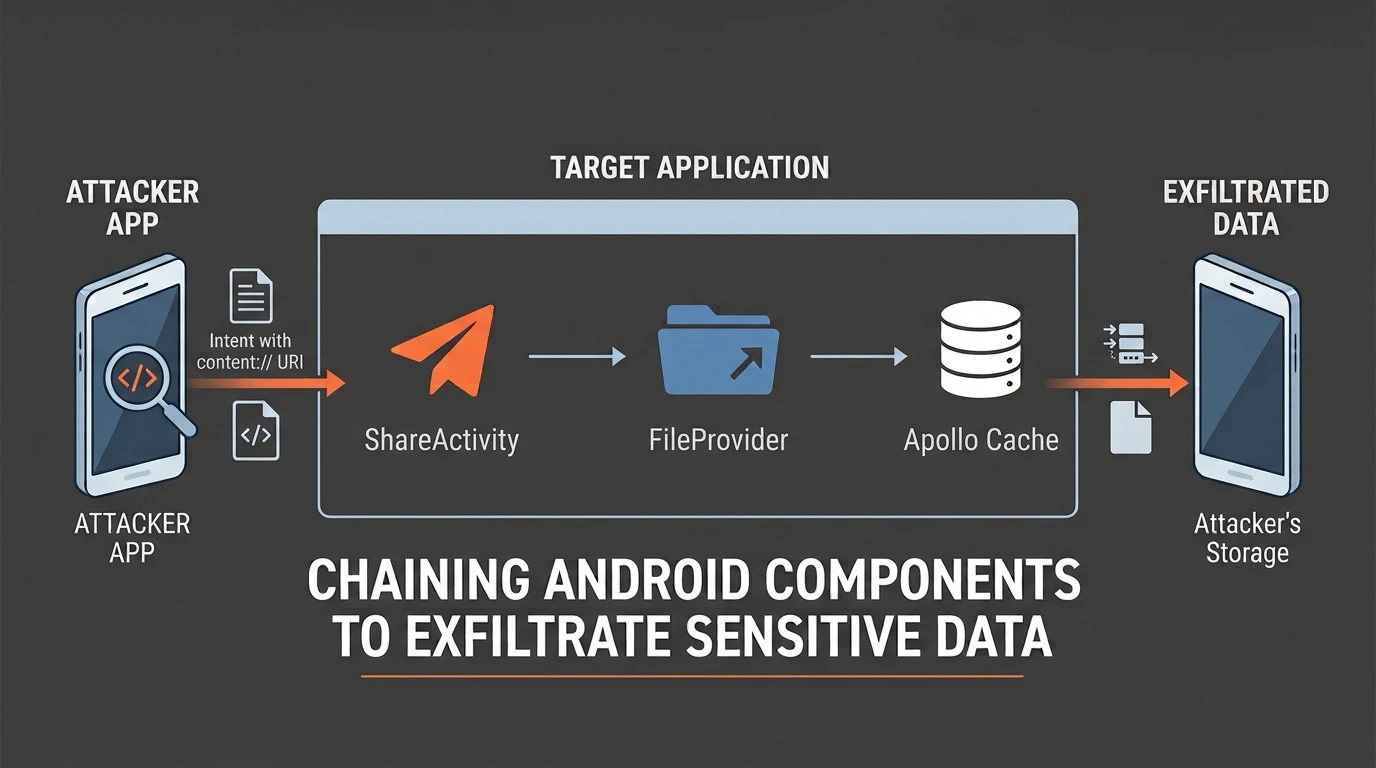
Chaining Android Components to Exfiltrate Sensitive Data from a Real-World Application
🔬 “Every vulnerability starts with a question”
Introduction
During a real-world security assessment of an Android application, I identified a chain of weaknesses that allowed a malicious co-installed application to access sensitive information belonging to the logged-in user.
The interesting part of this finding was not a single insecure component. Instead, the vulnerability resulted from several Android components interacting across a trust boundary:
- An overly broad
FileProviderconfiguration. - Sensitive data stored in the application’s cache.
- A predictable cache filename.
- An exported
Activitywithout permission restrictions. - Missing validation of attacker-controlled
content://URIs.
By chaining these behaviors together, it was possible to make the target application read its own protected data and write it into a location accessible to another application.
The result was unauthorized exposure of sensitive account information without requiring any interaction from the victim after the malicious application had been installed.
Disclosure note: All application-specific identifiers, sensitive information, screenshots, and other potentially identifying details have been sanitized or replaced with representative examples.
The Initial Attack Surface
During an Android security assessment, I usually start by building an understanding of the application’s attack surface before attempting to exploit individual findings.
I started by inspecting the application’s AndroidManifest.xml and looking for components that could potentially be reached by another application.
Analyzing the AndroidManifest.xml
1
2
3
4
<activity
    android:name="com.example.sharing.ShareActivity"
    android:exported="true"
    android:launchMode="singleTask" />
The Activity was exported and did not specify an explicit permission requirement.
This meant another application could potentially construct an explicit Intent targeting the component.
At this point, however, an exported Activity by itself does not necessarily represent a vulnerability.
The next question was:
What does this Activity actually do with attacker-controlled input?
Investigating the FileProvider
The next interesting component appeared to be the application’s FileProvider.
FileProviders are commonly used by Android applications to securely share files with other applications through content:// URIs.
Their security therefore depends heavily on how their exposed paths are configured.
During static analysis, I found a configuration conceptually equivalent to:
1
2
3
<cache-path
    name="downloads"
    path="/" />
So, the configured path was the root of the application’s cache directory.
Instead of exposing a specific directory containing files intended for sharing, the provider effectively made the entire cache directory addressable through its URI namespace.
The resulting URI structure looked similar to:
content://com.example.fileprovider/downloads/<filename>
This meant that if a filename could be predicted or otherwise discovered, files that were never intended to be shared could potentially become reachable through the provider.
Tracing the code
At this point, I wanted to understand what was actually stored inside the application’s cache directory.
Discovering the Apollo Cache
While inspecting the application’s behavior and filesystem, I identified a SQLite database used by the Apollo GraphQL client.
The database followed a predictable naming scheme:
apollo_cache_<username>
The important detail was that the username was derived from information that was already publicly available.
- For example:
1
2
3
4
5
Public profile:
https://example.com/u/target_username

Cache:
apollo_cache_target_username
This meant that an attacker did not need to brute-force or discover an unpredictable filename.
The name could be constructed from the victim’s public username.
What Information Does the Cache Contain?
The database contained cached GraphQL responses.
One of the cached records contained identity-related information, including sensitive account data.
For the purposes of this article, the actual values have been removed:
1
2
3
4
email:          [REDACTED]
phone:          [REDACTED]
userLocation:   [REDACTED]
accountId:      [REDACTED]
This was an important discovery, and now I had three interesting pieces:
- A sensitive file.
- A predictable filename.
- A
FileProviderexposing the application’s cache directory.
The next question was whether an external application could actually reach that file?
Investigating ShareActivity
I returned to the exported ShareActivity and followed the code responsible for handling shared content.
The relevant logic was responsible for processing an Intent containing Intent.EXTRA_STREAM.
The supplied value was retrieved as a Uri:
1
2
Uri uri =
    intent.getParcelableExtra(Intent.EXTRA_STREAM);
The first validation performed by the application was effectively:
1
2
3
4
5
if (!uri.normalizeScheme()
        .getScheme()
        .equals("content")) {
    throw new RuntimeException(...);
}
At this point, this may appear to be a validation step.
However, it only checked the URI scheme: it did not validate the URI authority.
For example, it did not restrict the accepted URI to a specific trusted provider.
This meant that both an attacker-controlled
content://URI and a URI pointing to an application-owned provider could satisfy the same validation condition.
The Missing Trust Boundary
The code eventually passed the supplied URI to:
1
getContentResolver().openInputStream(uri);
The important question became:
Which process is actually performing this operation?
The answer was the target application itself.
The Activity was operating with the application’s UID and therefore had access to resources that an external application would not necessarily be able to access directly. This created an interesting trust boundary violation:
“An attacker-controlled application could provide a URI to the target application, and the target application would then dereference that URI on the attacker’s behalf.”
At this point, the individual pieces started to connect:
1
2
3
4
5
6
7
8
9
10
11
12
13
Attacker-controlled URI
        |
        v
Exported ShareActivity
        |
        v
Target application's UID
        |
        v
FileProvider
        |
        v
Sensitive cache file
Forming the Exploitation Hypothesis
Based on the previous observations, I formulated the following hypothesis:
If I can construct the URI corresponding to the victim’s Apollo cache and make the exported Activity process it as an input file, the target application may read its own protected cache and copy the contents somewhere accessible to the attacker.
The target URI followed the predictable structure:
content://com.example.fileprovider/downloads/apollo_cache_<username>
But, the remaining problem was finding a way to make ShareActivity copy the raw contents of this URI.
Exploitation
The Activity contained multiple code paths for handling shared content. One of them was responsible for saving an image to the device’s gallery.
The relevant logic eventually performed operations equivalent to:
1
2
3
4
5
6
7
8
9
10
11
12
13
14
15
16
17
ContentValues values = new ContentValues();

values.put(
    "mime_type",
    "image/png"
);

Uri output =
    getContentResolver()
        .insert(
            MediaStore.Images.Media.EXTERNAL_CONTENT_URI,
            values
        );

InputStream input =
    getContentResolver()
        .openInputStream(uri);
Then, the application assumed the supplied content represented an image, but there was no validation ensuring that the source URI actually referenced image data.
As a result, arbitrary bytes could be passed through this code path. The source could therefore be the SQLite database rather than an actual image.
Chaining the Components
The complete attack chain looked like this:
1
2
3
4
5
6
7
8
9
10
11
12
13
14
15
16
17
18
19
20
21
22
23
24
25
26
27
28
Victim's public username
        |
        v
Predictable Apollo cache filename
        |
        v
FileProvider exposes cache directory
        |
        v
Crafted content:// URI
        |
        v
Exported ShareActivity
        |
        v
Target application opens URI
        |
        v
Apollo SQLite cache
        |
        v
MediaStore
        |
        v
Attacker application
        |
        v
Sensitive account information
Proof of Concept
To validate the hypothesis, I created a small Android PoC application.
The PoC constructed the target URI using the victim’s public username:
1
2
3
4
5
6
val victimUsername = "target_username"

val cacheUri = Uri.parse(
    "content://com.example.fileprovider/" +
    "downloads/apollo_cache_$victimUsername"
)
It then sent an explicit Intent to the exported Activity.
The sensitive details of the original PoC have been removed from this example.
The important part was the combination of:
1
ACTION_SEND + EXTRA_STREAM + crafted content:// URI + SaveImage routing
The target application processed the URI and copied the raw database contents into MediaStore.
The resulting file was therefore not actually a PNG.
It was a SQLite database containing the original cache contents.
For example:
1
2
$: file exfil.png
SQLite 3.x database
The file could then be parsed independently by the attacker application.
Impact
The vulnerability allowed a malicious co-installed application to access sensitive information associated with the logged-in user.
The attack required:
- The victim to have the target application installed and logged in.
- A malicious application to be installed on the same device.
- The attacker application to have access to the resulting MediaStore file.
No additional interaction from the victim was required after the malicious application was installed.
The exposed information included private account information that was not intended to be publicly accessible.
From an attacker perspective, the interesting aspect of this vulnerability is that the attack does not directly bypass the application’s storage isolation.
Instead, the attacker abuses the target application itself as a privileged intermediary.
The Root Cause
1. Overly Broad FileProvider Path
The FileProvider exposed the root of the application’s cache directory:
1
2
3
<cache-path
    name="downloads"
    path="/" />
- The provider should only expose files that are explicitly intended for external sharing.
2. Missing URI Authority Validation
The exported Activity validated that the supplied URI used the content:// scheme but did not validate its authority.
- A stronger validation strategy should establish which providers are trusted sources for the operation.
3. Exported Activity Without Access Control
The Activity was externally accessible without a permission restriction.
- This allowed arbitrary applications to invoke its functionality.
4. Insufficient Content Validation
The code path assumed that the supplied URI contained image data but did not verify the content before copying it into MediaStore.
These issues became significantly more severe when combined.
Remediation
There are several layers at which this attack chain can be broken.
Restrict FileProvider Paths
The FileProvider should expose only directories containing files explicitly intended for external sharing.
For example:
1
2
3
<cache-path
    name="shared_files"
    path="shared/" />
Avoid exposing broad filesystem locations such as:
1
path="/"
when they contain application-internal data.
Validate URI Authorities
The application should not blindly dereference arbitrary content:// URIs received from external applications.
Where appropriate, validate the URI authority and ensure that the provider is an expected source for the operation.
Restrict Exported Components
If an Activity does not need to be accessible by arbitrary applications, it should not be exported.
If external access is required, an appropriate permission model should be considered.
For example:
1
android:permission="com.example.permission.SHARE"
The exact permission design should depend on the intended sharing model.
Validate the Actual Content
The application should verify that the content being processed matches the expected type and operation.
A file being reachable through a content:// URI does not mean that it is necessarily an image.
Conclusion
The vulnerability demonstrated how an attacker-controlled application could abuse an exported Android component to make the target application access its own sensitive data and expose it through a location accessible to the attacker.
The most interesting part of the assessment was not any individual configuration issue.
It was identifying the relationships between the application’s components and realizing that they could be chained together.
For me, this is one of the most valuable aspects of mobile application security testing:
“Understanding the application well enough to turn small observations into concrete attack hypotheses”.
If you have any questions or want to discuss Android application security research, feel free to reach out to me on LinkedIn.
Happy Hacking!!