Writeup of APKey Challenge of Hack The Box
Resolution of APKey Challenge of Hack The Box
🔬 “Analyze it, understand it and BREAK it!”..
Introduction
This challenge includes mobile reverse engineering, understanding of the Android basics like Java, Kotlin and Smali code, but it also will introduce us to a crypto obfuscated code which we’ll need to decrypt if we opt to solve it via static analysis only, otherwise it’s possible to resolve this challenge using Frida, as we’ll cover in this writeup.
I really hope you could enjoy this challenge as much as I did. So, let’s start with the setup!
The APK file
Once the APKey.apk file is downloaded, we are going to decompile it to read the code. To do so, we can use APKtool. I recommend always using latest version for better compatibility when decompiling.
- Decompile the APK:
1
2
3
4
5
6
7
8
9
10
11
12
$: apktool v
2.12.1
$: apktool d APKey.apk -o APKey
I: Using Apktool 2.12.1 on APKey.apk with 8 threads
I: Baksmaling classes.dex...
I: Loading resource table...
I: Decoding file-resources...
I: Loading resource table from file: /home/hackermater/.local/share/apktool/framework/1.apk
I: Decoding values */* XMLs...
I: Decoding AndroidManifest.xml with resources...
I: Copying original files...
I: Copying unknown files...
Once decompiled, we can take a look at the source code in a readable format. Let’s take a look at the AndroidManifest.xml
- AndroidManifest.xml:
1
2
3
4
5
6
7
8
9
10
11
<?xml version="1.0" encoding="utf-8"?>
<manifest xmlns:android="http://schemas.android.com/apk/res/android" android:compileSdkVersion="30" android:compileSdkVersionCodename="11" package="com.example.apkey" platformBuildVersionCode="30" platformBuildVersionName="11">
    <application android:allowBackup="true" android:appComponentFactory="androidx.core.app.CoreComponentFactory" android:icon="@mipmap/ic_launcher" android:label="@string/app_name" android:roundIcon="@mipmap/ic_launcher_round" android:supportsRtl="true" android:theme="@style/Theme.APKey">
        <activity android:name="com.example.apkey.MainActivity">
            <intent-filter>
                <action android:name="android.intent.action.MAIN"/>
                <category android:name="android.intent.category.LAUNCHER"/>
            </intent-filter>
        </activity>
    </application>
</manifest>
Here we have some intersting things:
- Package Name:
com.example.apkey. - The AndroidManifest.xml declares the MainActivity:
com.example.apkey.MainActivity. - The application allows backup:
android:allowBackup="true". * This attribute leads to sensitive data exfiltration when an attacker has access to a shell on the victim’s device. Therefore, it is considered a vulnerability if the app is in production. - And the minimum Android version allowed is
11and the minimum Android SDK version is30.
Static Analysis of the source code with Jadx
Once the APKey.apk is opened with Jadx, we can simply quickly navigate to the MainActivity clicking on the Home button on the top bar:
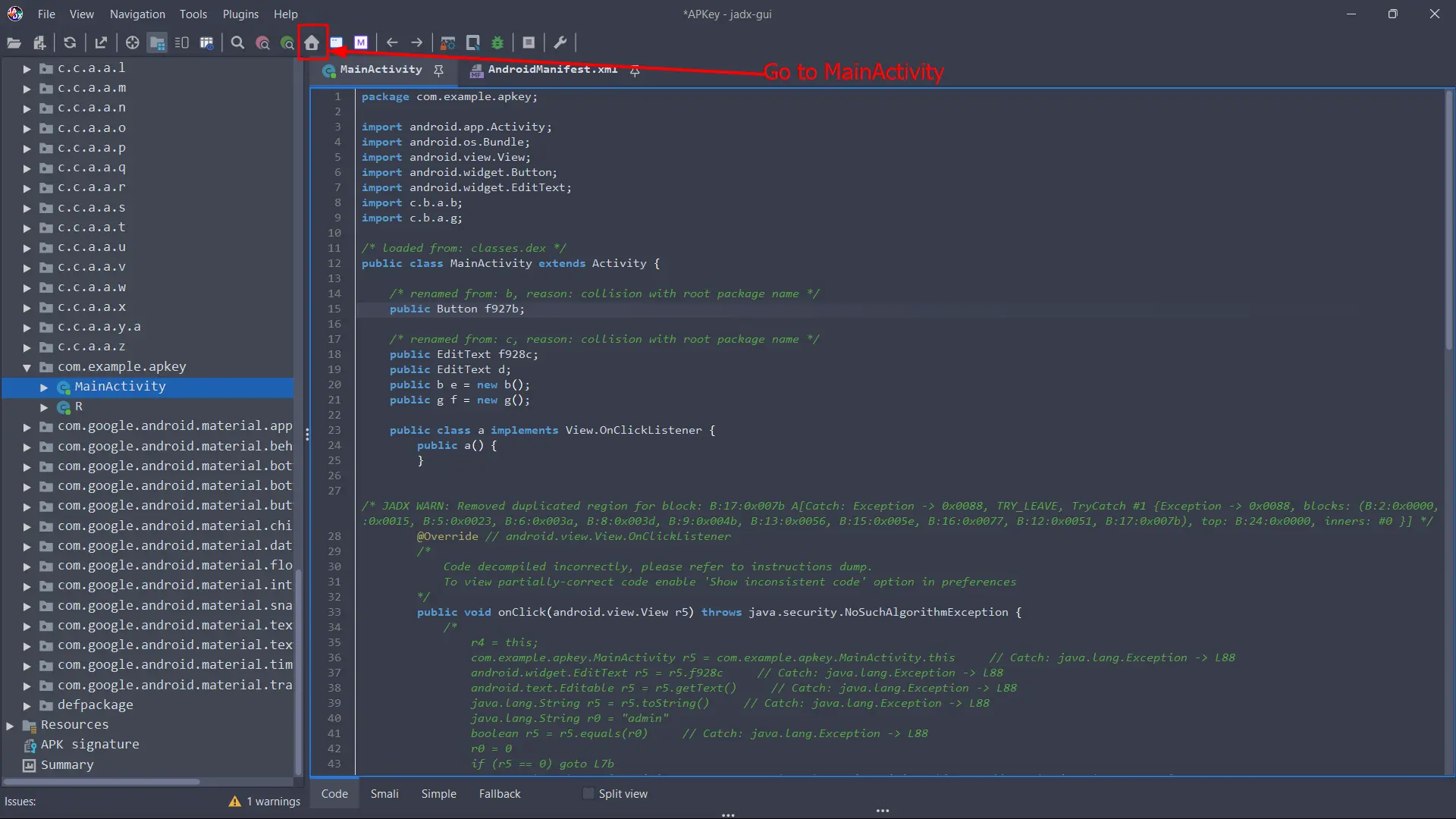
Starting from the MainActivity we can take an overview of which functions are executed when the user starts the application. So after a review we can focus on the main fuction of this class:
1
2
3
4
5
6
7
8
9
10
11
12
13
14
15
16
17
18
19
20
21
22
23
24
25
26
27
28
29
30
31
32
33
34
35
36
37
38
39
40
41
42
43
44
45
46
47
48
49
50
51
52
53
54
55
56
57
58
59
60
61
62
63
64
65
66
67
68
69
70
71
72
73
74
75
76
public void onClick(android.view.View r5) throws java.security.NoSuchAlgorithmException {
            /*
                r4 = this;
                com.example.apkey.MainActivity r5 = com.example.apkey.MainActivity.this     // Catch: java.lang.Exception -> L88
                android.widget.EditText r5 = r5.f928c     // Catch: java.lang.Exception -> L88
                android.text.Editable r5 = r5.getText()     // Catch: java.lang.Exception -> L88
                java.lang.String r5 = r5.toString()     // Catch: java.lang.Exception -> L88
                java.lang.String r0 = "admin"

                boolean r5 = r5.equals(r0)     // Catch: java.lang.Exception -> L88
                r0 = 0
                if (r5 == 0) goto L7b
                com.example.apkey.MainActivity r5 = com.example.apkey.MainActivity.this     // Catch: java.lang.Exception -> L88
                c.b.a.b r1 = r5.e     // Catch: java.lang.Exception -> L88
                android.widget.EditText r5 = r5.d     // Catch: java.lang.Exception -> L88
                android.text.Editable r5 = r5.getText()     // Catch: java.lang.Exception -> L88
                java.lang.String r5 = r5.toString()     // Catch: java.lang.Exception -> L88
                java.lang.String r1 = "MD5"
                java.security.MessageDigest r1 = java.security.MessageDigest.getInstance(r1)     // Catch: java.security.NoSuchAlgorithmException -> L50 java.lang.Exception -> L88
                byte[] r5 = r5.getBytes()     // Catch: java.security.NoSuchAlgorithmException -> L50 java.lang.Exception -> L88
                r1.update(r5)     // Catch: java.security.NoSuchAlgorithmException -> L50 java.lang.Exception -> L88
                byte[] r5 = r1.digest()     // Catch: java.security.NoSuchAlgorithmException -> L50 java.lang.Exception -> L88
                java.lang.StringBuffer r1 = new java.lang.StringBuffer     // Catch: java.security.NoSuchAlgorithmException -> L50 java.lang.Exception -> L88
                r1.<init>()     // Catch: java.security.NoSuchAlgorithmException -> L50 java.lang.Exception -> L88

                r2 = 0
            L3a:
                int r3 = r5.length     // Catch: java.security.NoSuchAlgorithmException -> L50 java.lang.Exception -> L88
                if (r2 >= r3) goto L4b
                r3 = r5[r2]     // Catch: java.security.NoSuchAlgorithmException -> L50 java.lang.Exception -> L88
                r3 = r3 & 255(0xff, float:3.57E-43)
                java.lang.String r3 = java.lang.Integer.toHexString(r3)     // Catch: java.security.NoSuchAlgorithmException -> L50 java.lang.Exception -> L88
                r1.append(r3)     // Catch: java.security.NoSuchAlgorithmException -> L50 java.lang.Exception -> L88
                int r2 = r2 + 1
                goto L3a
            L4b:
                java.lang.String r5 = r1.toString()     // Catch: java.security.NoSuchAlgorithmException -> L50 java.lang.Exception -> L88
                goto L56
            L50:
                r5 = move-exception
                r5.printStackTrace()     // Catch: java.lang.Exception -> L88
                java.lang.String r5 = ""
            L56:
                java.lang.String r1 = "a2a3d412e92d896134d9c9126d756f"
                boolean r5 = r5.equals(r1)     // Catch: java.lang.Exception -> L88
                if (r5 == 0) goto L7b
                com.example.apkey.MainActivity r5 = com.example.apkey.MainActivity.this     // Catch: java.lang.Exception -> L88
                android.content.Context r5 = r5.getApplicationContext()     // Catch: java.lang.Exception -> L88
                com.example.apkey.MainActivity r0 = com.example.apkey.MainActivity.this     // Catch: java.lang.Exception -> L88
                c.b.a.b r1 = r0.e     // Catch: java.lang.Exception -> L88
                c.b.a.g r0 = r0.f     // Catch: java.lang.Exception -> L88
                java.lang.String r0 = c.b.a.g.a()     // Catch: java.lang.Exception -> L88
                java.lang.String r0 = c.b.a.b.a(r0)     // Catch: java.lang.Exception -> L88
                r1 = 1

                android.widget.Toast r5 = android.widget.Toast.makeText(r5, r0, r1)     // Catch: java.lang.Exception -> L88
            L77:
                r5.show()     // Catch: java.lang.Exception -> L88
                goto L8c
            L7b:
                com.example.apkey.MainActivity r5 = com.example.apkey.MainActivity.this     // Catch: java.lang.Exception -> L88
                android.content.Context r5 = r5.getApplicationContext()     // Catch: java.lang.Exception -> L88
                java.lang.String r1 = "Wrong Credentials!"
                android.widget.Toast r5 = android.widget.Toast.makeText(r5, r1, r0)     // Catch: java.lang.Exception -> L88

                goto L77
            L88:
                r5 = move-exception
                r5.printStackTrace()
            L8c:
                return

            */
            throw new UnsupportedOperationException("Method not decompiled: com.example.apkey.MainActivity.a.onClick(android.view.View):void");
        }
    }
But we have to be careful with this code in Jadx, because as it’s seen above the function, it’s shown this warn:
1
2
3
4
        /*
            Code decompiled incorrectly, please refer to instructions dump.
            To view partially-correct code enable 'Show inconsistent code' option in preferences
        */
Another approach we can take is to see the code from the “Simple” view, this is helpful to read and understand faster the code from a visual perspective:
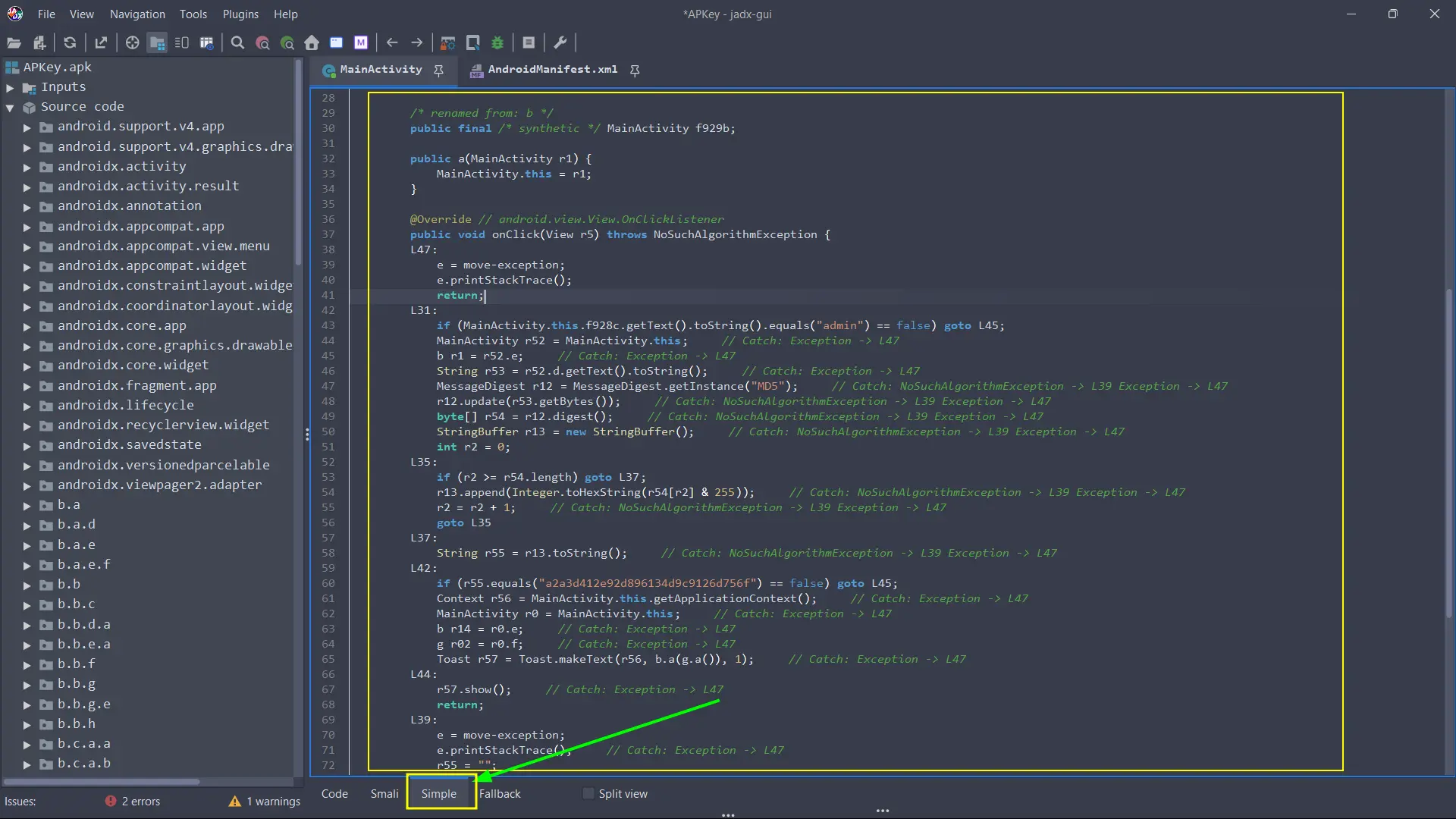
Understanding the code
From this point, we can identify some aspects of the execution flow:
1
2
3
4
5
6
7
8
9
10
11
12
13
14
15
16
17
18
19
20
21
22
23
24
25
26
27
28
29
30
31
32
33
34
35
36
37
38
39
40
41
42
43
@Override // android.view.View.OnClickListener
        public void onClick(View r5) throws NoSuchAlgorithmException {
        L47:
            e = move-exception;
            e.printStackTrace();
            return;
        L31:
            if (MainActivity.this.f928c.getText().toString().equals("admin") == false) goto L45;
            MainActivity r52 = MainActivity.this;     // Catch: Exception -> L47
            b r1 = r52.e;     // Catch: Exception -> L47
            String r53 = r52.d.getText().toString();     // Catch: Exception -> L47
            MessageDigest r12 = MessageDigest.getInstance("MD5");     // Catch: NoSuchAlgorithmException -> L39 Exception -> L47
            r12.update(r53.getBytes());     // Catch: NoSuchAlgorithmException -> L39 Exception -> L47
            byte[] r54 = r12.digest();     // Catch: NoSuchAlgorithmException -> L39 Exception -> L47
            StringBuffer r13 = new StringBuffer();     // Catch: NoSuchAlgorithmException -> L39 Exception -> L47
            int r2 = 0;
        L35:
            if (r2 >= r54.length) goto L37;
            r13.append(Integer.toHexString(r54[r2] & 255));     // Catch: NoSuchAlgorithmException -> L39 Exception -> L47
            r2 = r2 + 1;     // Catch: NoSuchAlgorithmException -> L39 Exception -> L47
            goto L35
        L37:
            String r55 = r13.toString();     // Catch: NoSuchAlgorithmException -> L39 Exception -> L47
        L42:
            if (r55.equals("a2a3d412e92d896134d9c9126d756f") == false) goto L45;
            Context r56 = MainActivity.this.getApplicationContext();     // Catch: Exception -> L47
            MainActivity r0 = MainActivity.this;     // Catch: Exception -> L47
            b r14 = r0.e;     // Catch: Exception -> L47
            g r02 = r0.f;     // Catch: Exception -> L47
            Toast r57 = Toast.makeText(r56, b.a(g.a()), 1);     // Catch: Exception -> L47
        L44:
            r57.show();     // Catch: Exception -> L47

            return;
        L39:
            e = move-exception;
            e.printStackTrace();     // Catch: Exception -> L47
            r55 = "";
        L45:
            r57 = Toast.makeText(MainActivity.this.getApplicationContext(), "Wrong Credentials!", 0);     // Catch: Exception -> L47
            goto L44
        }
    }
- We can identify the first logic:
1
if (MainActivity.this.f928c.getText().toString().equals("admin") == false) goto L45;
If the username is not
admin, the app will execute theL45code, which it means that we cannot login as they are “Wrong Credentials!”.
1
2
3
4
L45:
    r57 = Toast.makeText(MainActivity.this.getApplicationContext(), "Wrong Credentials!", 0);     // Catch: Exception -> L47
    goto L44
    }
Therefore, admin must be the username.
- In a second instance, we can also locate the following line, which make reference to the password.
1
if (r55.equals("a2a3d412e92d896134d9c9126d756f") == false) goto L45;
If the MD5 hash of the password is not
a2a3d412e92d896134d9c9126d756fthen the app will execute the code ofL45again (Wrong Credentials).
Second part of Static Analysis: Deobfuscate the code
Returing to the onClick() function in the Code view, we can locate the following code execution logic:
1
2
3
4
5
6
7
8
9
10
11
12
13
14
15
16
L56:
        java.lang.String r1 = "a2a3d412e92d896134d9c9126d756f"
        boolean r5 = r5.equals(r1)     // Catch: java.lang.Exception -> L88
        if (r5 == 0) goto L7b
        com.example.apkey.MainActivity r5 = com.example.apkey.MainActivity.this     // Catch: java.lang.Exception -> L88
        android.content.Context r5 = r5.getApplicationContext()     // Catch: java.lang.Exception -> L88
        com.example.apkey.MainActivity r0 = com.example.apkey.MainActivity.this     // Catch: java.lang.Exception -> L88
        c.b.a.b r1 = r0.e     // Catch: java.lang.Exception -> L88
        c.b.a.g r0 = r0.f     // Catch: java.lang.Exception -> L88
        java.lang.String r0 = c.b.a.g.a()     // Catch: java.lang.Exception -> L88
        java.lang.String r0 = c.b.a.b.a(r0)     // Catch: java.lang.Exception -> L88
        r1 = 1
        android.widget.Toast r5 = android.widget.Toast.makeText(r5, r0, r1)     // Catch: java.lang.Exception -> L88
    L77:
        r5.show()     // Catch: java.lang.Exception -> L88
        goto L8c
So far we have already seen at the first lines of the MainActivity these following activities imported:
1
2
3
4
5
6
7
8
9
package com.example.apkey;

import android.app.Activity;
import android.os.Bundle;
import android.view.View;
import android.widget.Button;
import android.widget.EditText;
import c.b.a.b;
import c.b.a.g;
Then we find the c.b.a.b and c.b.a.g activities called during the L56 code logic. (The previous code snippet).
The
c.b.a.g.a()is calling a function from the activityc.b.a.gand in other hand, thec.b.a.b.a(r0)is calling thec.b.a.bactivity parsing the previous result. Finally in theL77, ther5.show()is showing the Flag. (Of course, correct credentials).
From Jadx we move to those activities and we found obfuscated code like this:
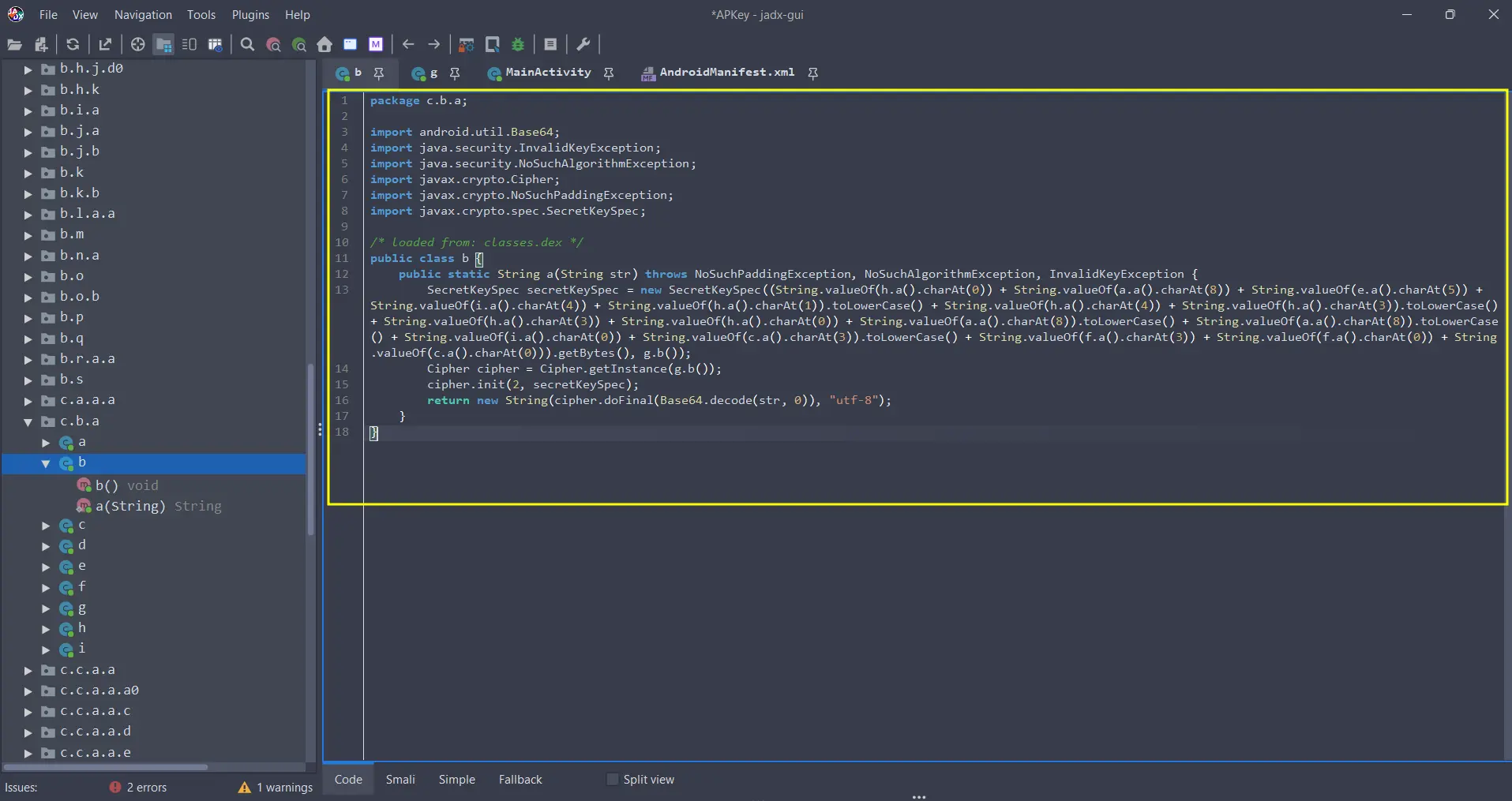
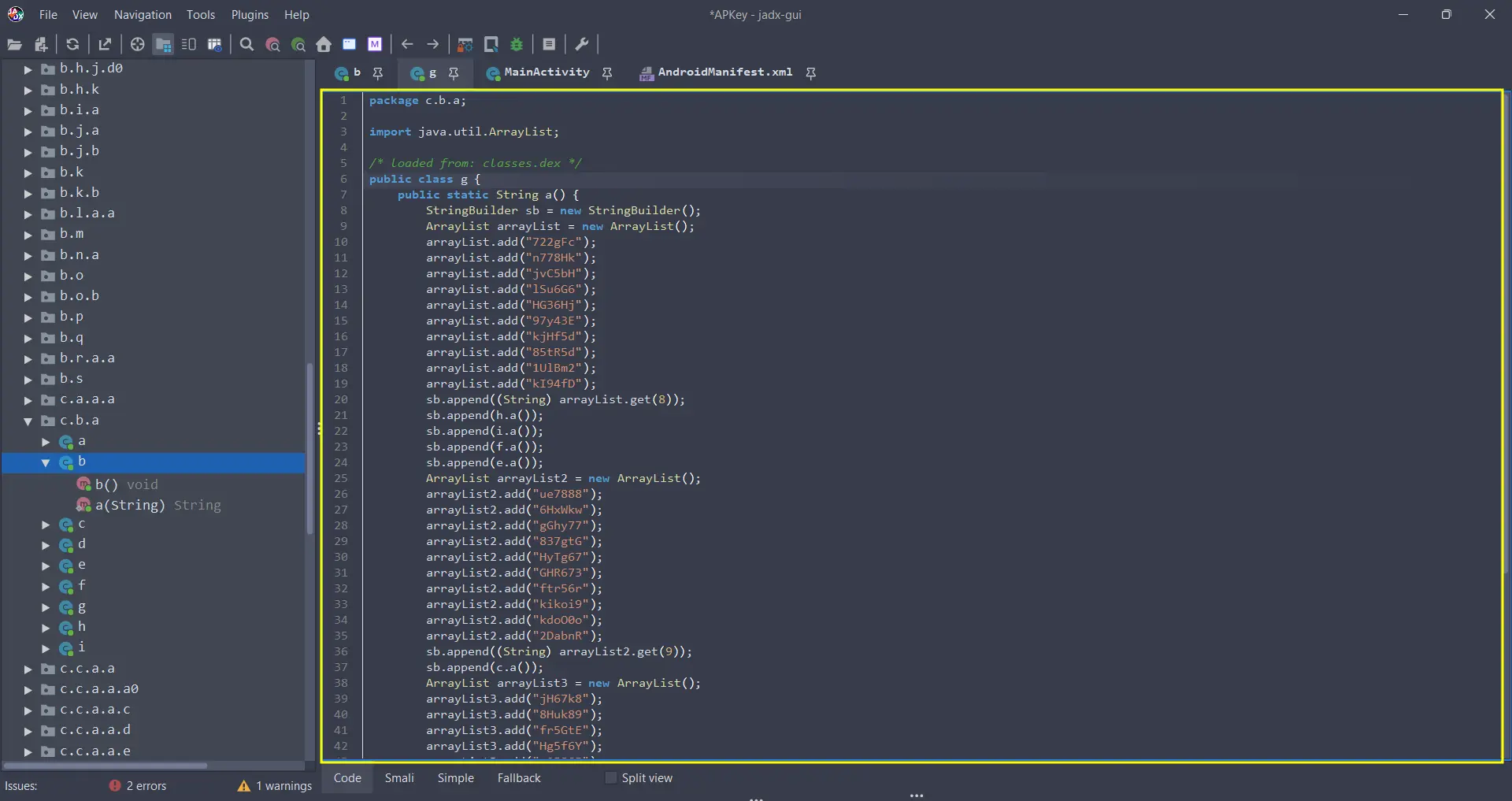
And yes… We can go and deobfuscate each part of the code but, I found a simpler way: Frida
Next step: Dynamic Analysis and Frida Hooking
To use Frida we need:
- An Android Device: it can be a physical rooted device or an Android Virtual Device Emulator
- Access to root execution via adb shell or the ability to inject the Frida Gadget. But this writeup focuses on Frida Server, so we’ll only take approach of the root execution in the Android Emulator.
Runtime execution bypass
So we proceed to install our APK file with:
1
$: adb install APKey.apk
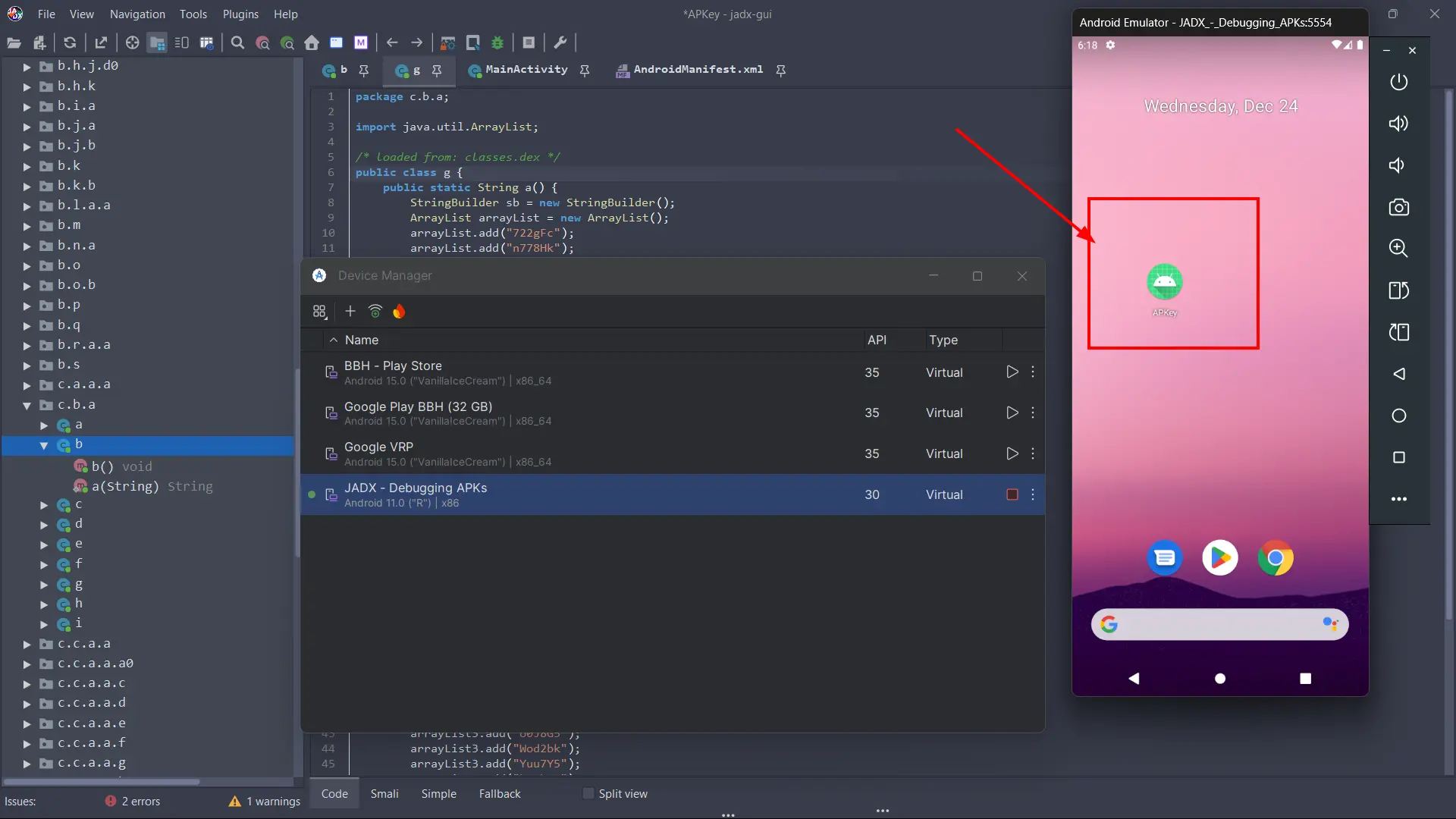
Then the second step is needed to be taken carefully to avoid errors in the process:
- Download the latest version of Frida Server: I use fridaDownloader - A powerful script to download the latest or custom version of Frida Gadget or Server from terminal.
- Download the latest version of
fridaandfrida-toolsinside a pip environment:
1
2
3
$: python3 -m venv env
$: source env/bin/activate
$: (env) pip install --upgrade frida frida-tools
Once we have all set, we need to push the frida-server binary into the device storage:
1
2
3
4
5
6
$: adb push frida-server-17.5.2-android-x86 /data/local/tmp/frida-server
$: adb shell
## From the adb shell
$: su
#: chmod 0755 /data/local/tmp/frida-server
#: /data/local/tmp/frida-server &
Ensure that the version of Frida corresponds to the architecture of your device. For further info see: https://hackermater.gitbook.io/pentesting-notes/mobile-pentesting/dynamic-analysis#detect-android-devices-architecture
Bypassing the login and capturing the flag
Now comes the final and fun part: hook with Frida Server the functions and bypass the code logic.
We’ve previously seen that the username is admin, and that the password must match with the MD5 hash a2a3d412e92d896134d9c9126d756f. But we’ve also seen this code execution logic:
1
2
3
4
5
6
7
8
9
10
11
12
13
14
15
16
L56:
        java.lang.String r1 = "a2a3d412e92d896134d9c9126d756f"
        boolean r5 = r5.equals(r1)     // Catch: java.lang.Exception -> L88
        if (r5 == 0) goto L7b
        com.example.apkey.MainActivity r5 = com.example.apkey.MainActivity.this     // Catch: java.lang.Exception -> L88
        android.content.Context r5 = r5.getApplicationContext()     // Catch: java.lang.Exception -> L88
        com.example.apkey.MainActivity r0 = com.example.apkey.MainActivity.this     // Catch: java.lang.Exception -> L88
        c.b.a.b r1 = r0.e     // Catch: java.lang.Exception -> L88
        c.b.a.g r0 = r0.f     // Catch: java.lang.Exception -> L88
        java.lang.String r0 = c.b.a.g.a()     // Catch: java.lang.Exception -> L88
        java.lang.String r0 = c.b.a.b.a(r0)     // Catch: java.lang.Exception -> L88
        r1 = 1
        android.widget.Toast r5 = android.widget.Toast.makeText(r5, r0, r1)     // Catch: java.lang.Exception -> L88
    L77:
        r5.show()     // Catch: java.lang.Exception -> L88
        goto L8c
So we can create a function in JavaScript to bypass the conditional boolean for the password, and directly force the application to give us the flag.
- Frida code snippet:
1
2
3
4
5
6
7
8
9
10
11
12
13
14
15
16
17
18
19
20
21
22
23
24
25
26
27
Java.perform(function () {

    var class_b = Java.use("c.b.a.b");
    var class_g = Java.use("c.b.a.g");

    var onClickListener = Java.use("com.example.apkey.MainActivity$a");

    onClickListener.onClick.implementation = function (view) {
        console.log("[+] Button clicked. Generating flag directly...");

        try {
            var encryptedString = class_g.a();

            console.log("[*] Input (g.a): " + encryptedString);

            var flag = class_b.a(encryptedString);

            console.log("[!] FLAG FOUND: " + flag);

        } catch (err) {
            console.log("[-] Error calling methods: " + err);
        }
    };

    console.log("[+] Script loaded. Press ANY button in the App to see the flag.");

});
How this works and how to use it?
- With
Java.use("com.example.apkey.MainActivity$a")we hook this specific class that handles the button click. - We use
.implementationto replace the original password check with our own code to bypass the code logic. - We manually call
class_g.a()and pass it toclass_b.a(). This forces the app to run the decryption functions regardless of the input! - Finally, we print in console with
console.log(...)the flag obtained.
1
$: frida -U -f com.example.apkey -l solve.js
Frida Usage:
-Ufor USB debugging.-fdirectly call the app by its package name.-lloads the JS script.
So we PWNED the app:
1
2
3
4
5
6
7
8
9
10
11
12
13
14
15
16
17
$: frida -U -f com.example.apkey -l solve.js
     ____
    / _  |   Frida 17.5.2 - A world-class dynamic instrumentation toolkit
   | (_| |
    > _  |   Commands:
   /_/ |_|       help      -> Displays the help system
   . . . .       object?   -> Display information about 'object'
   . . . .       exit/quit -> Exit
   . . . .
   . . . .   More info at https://frida.re/docs/home/
   . . . .
   . . . .   Connected to Android Emulator 5554 (id=emulator-5554)
Spawned `com.example.apkey`. Resuming main thread!
[Android Emulator 5554::com.example.apkey ]-> [+] Script loaded. Press ANY button in the App to see the flag.
[+] Button clicked. Generating flag directly...
[*] Input (g.a): 1UlBm2kHtZuVrSE6qY6HxWkwHyeaX92DabnRFlEGyLWod2bkwAxcoc85S94kFpV1
[!] FLAG FOUND: HTB{m0r3_0bfusc4t1on_w0uld_n0t_hurt}
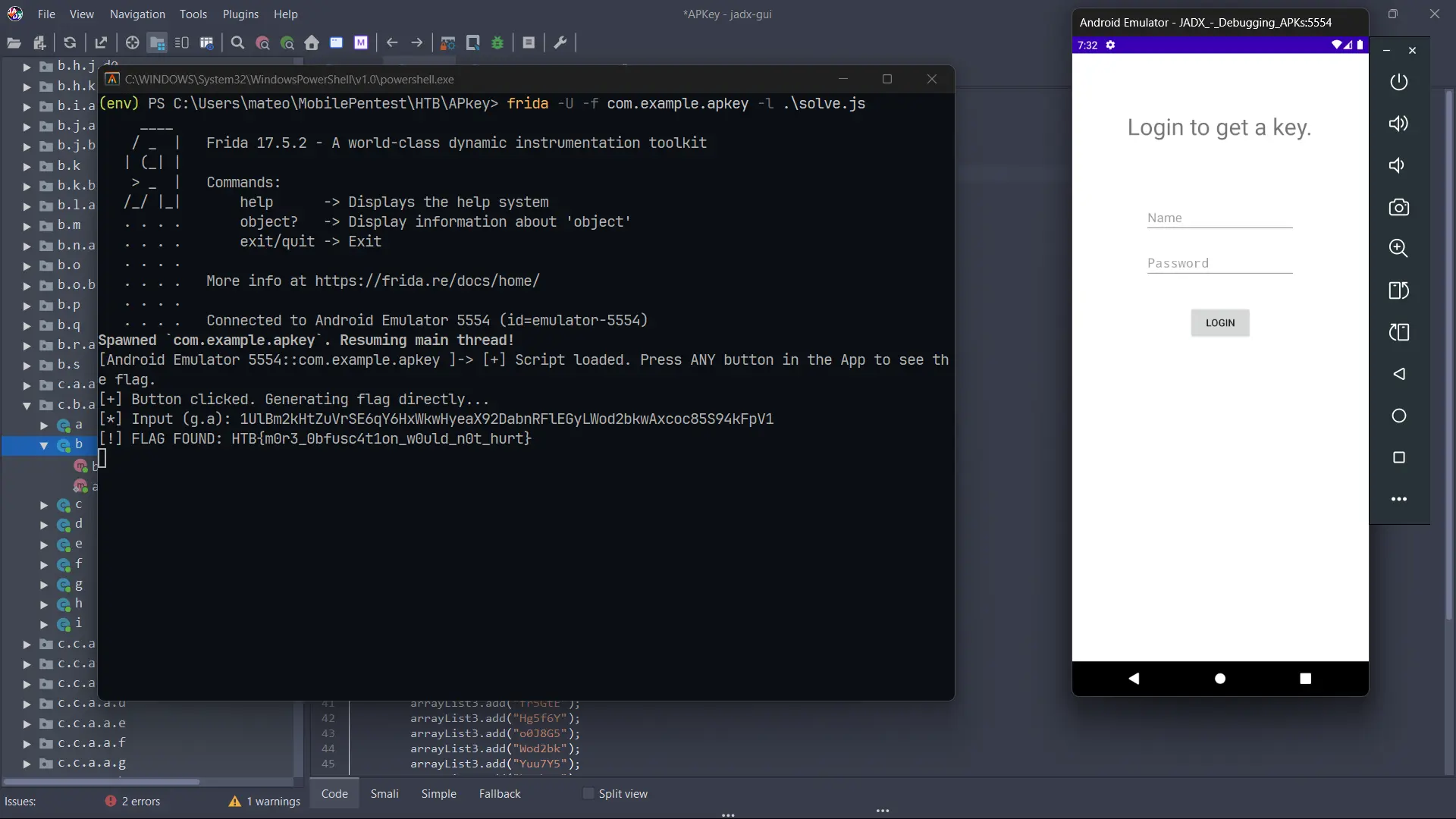
I hope you found this writeup useful. If you have any doubts or tips, reach out to me on LinkedIn and let’s connect!
Happy Hacking!!